Distributed DB
For distributed deployments, Cobble uses multiple shard Db instances coordinated by a single DbCoordinator to produce globally consistent snapshots.
Core Components
- Db — A shard database responsible for a subset of bucket ranges.
- DbCoordinator — A coordinator that assembles shard snapshots into one global snapshot manifest.
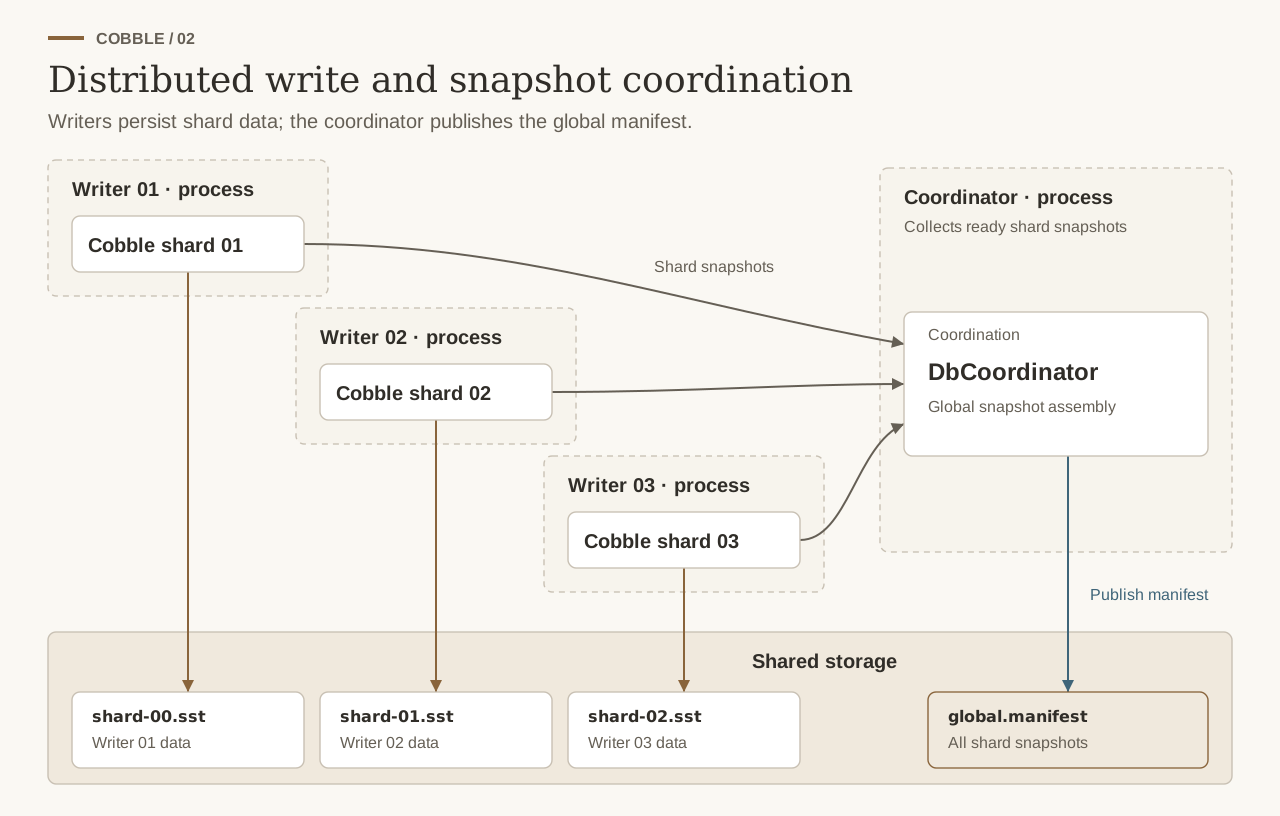
Data writes stay with the shard writers. The coordinator publishes metadata, not the shard data itself.
Column Families
Distributed ownership stays bucket-only. If a shard owns bucket 100, it owns every column family inside bucket 100.
- Reads and writes still choose a named family through
WriteOptions,ReadOptions, andScanOptions. ScanPlan/ScanSplitstay bucket/shard work units and do not route by family.- When a worker opens a scanner from a split, it must pass
ScanOptions::with_column_family(...)(or JavaScanOptions.columnFamily(...)) if it wants a non-default family. - Snapshot metadata preserves a consistent named-family mapping across shards, and the coordinator rejects snapshots if shards disagree on it.
Opening Shard Databases
Each shard is assigned non-overlapping bucket ranges:
use cobble::Db;

// Shard 1: buckets 0..=499
let db1 = Db::open(config1, vec![0..=499])?;

// Shard 2: buckets 500..=999
let db2 = Db::open(config2, vec![500..=999])?;
Opening the Coordinator
use cobble::{CoordinatorConfig, DbCoordinator};

let coord = DbCoordinator::open(CoordinatorConfig {
    volumes: coordinator_volumes,
    snapshot_retention: Some(5),
})?;
Write Path
db1.put(100, b"key-a", 0, b"value-a")?;  // bucket 100 -> shard 1
db2.put(700, b"key-b", 0, b"value-b")?;  // bucket 700 -> shard 2
Taking a Global Snapshot
// 1) each shard snapshots and exports a shard snapshot input
let snap1 = db1.snapshot()?;
let snap2 = db2.snapshot()?;
let input1 = db1.shard_snapshot_metadata(snap1)?;
let input2 = db2.shard_snapshot_metadata(snap2)?;

// 2) coordinator creates + materializes a global snapshot
let global_manifest = coord.take_global_snapshot(total_buckets, vec![input1, input2])?;
coord.materialize_global_snapshot(&global_manifest)?;
println!("Global snapshot ID: {}", global_manifest.id);
Restoring from a Global Snapshot
Restore order is: coordinator first, then each shard.
let coord = DbCoordinator::open(coordinator_config)?;
let manifest = coord.load_global_snapshot(global_snapshot_id)?;

// Select the shard refs that belong to each shard process.
// (Selection criteria is typically db_id or bucket ranges.)
let s1 = &manifest.shard_snapshots[0];
let s2 = &manifest.shard_snapshots[1];

let db1 = Db::open_new_with_snapshot(config1, s1.snapshot_id, s1.db_id.clone())?;
let db2 = Db::open_new_with_snapshot(config2, s2.snapshot_id, s2.db_id.clone())?;
The restored manifest still preserves the named column-family layout, but shard selection and routing remain bucket-range based.
Use Db::open_from_snapshot(...) only when you intentionally want to keep restoring into the same db identity. For bootstrapping a fresh shard runtime, prefer Db::open_new_with_snapshot(...). If your checkpoint metadata already stores the exact manifest path, use Db::open_new_with_manifest_path(...) instead of reconstructing (db_id, snapshot_id).
All files referenced by the snapshot (SST, Parquet, VLOG, manifests, schemas) must be accessible from the configured volumes during restore.
Advanced: Rescale Bucket Ownership
For runtime shard rebalance details, see Architecture / Online Rescale.