Reader & Distributed Scan
Reader — Snapshot-Following Read Service
Reader is not a per-write real-time view. It reads from materialized global snapshots, so visibility advances only when:
- writers create and materialize a newer snapshot, and
- the reader refreshes (auto or manual) to that snapshot.
This makes Reader ideal for low-latency serving on a stable view, but with freshness bounded by snapshot cadence.
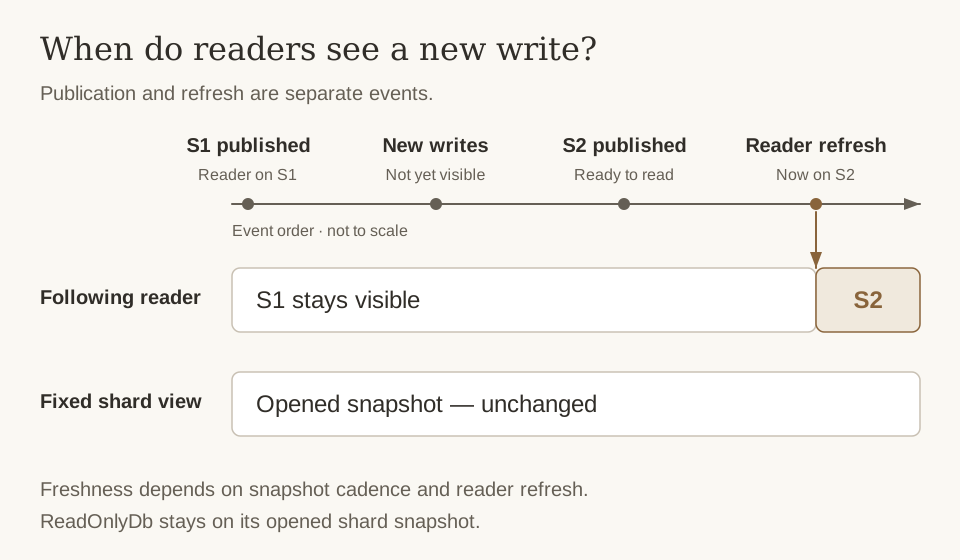
Publication makes a snapshot available; refresh makes it visible to a following reader. For a fixed shard view, ReadOnlyDb stays on its opened snapshot until reopened.
Opening a Reader
use cobble::{ReadOptions, Reader, ReaderConfig, VolumeDescriptor};

let read_config = ReaderConfig {
    volumes: VolumeDescriptor::single_volume("file:///tmp/my-db"),
    total_buckets: 1024,
    ..ReaderConfig::default()
};

let mut reader = Reader::open_current(read_config)?;
Point Lookup
let value = reader.get(0, b"user:1")?;
let metrics = reader.get_with_options(
    0,
    b"user:1",
    &ReadOptions::for_column_in_family("metrics", 0),
)?;
Column Families
Reader, ReadOnlyDb, Db, and SingleDb all keep routing bucket-only. Plain get / scan calls use the default family; named families are chosen through options:
use cobble::{Config, ReadOnlyDb, ReadOptions, ScanOptions};

let read_only = ReadOnlyDb::open_with_db_id(config, snapshot_id, db_id)?;
let value = read_only.get_with_options(
    0,
    b"key",
    &ReadOptions::for_column_in_family("metrics", 0),
)?;
let scanner = read_only.scan_with_options(
    0,
    b"a".as_ref()..b"z".as_ref(),
    &ScanOptions::for_column(0).with_column_family("metrics"),
)?;
Refreshing and Visibility
Call refresh() to pick up a newer materialized snapshot:
reader.refresh()?;
In open_current mode, reads may auto-check pointer changes, throttled by reader.reload_tolerance_seconds (default: 10s). If writers snapshot every minute, reader-visible data can lag by up to about one snapshot interval plus refresh tolerance.
Reader Config
| Parameter | Default | Description |
|---|---|---|
reader.pin_partition_in_memory_count | 1 | Number of partition snapshots pinned in memory |
reader.block_cache_size | 512 MB | Block cache size for reader |
reader.reload_tolerance_seconds | 10 | Minimum interval between snapshot reload checks |
ReadOnlyDb — Snapshot-Based Read on one shard
ReadOnlyDb opens a specific snapshot for read-only access on one shard (corresponding to a single Db):
use cobble::{Config, ReadOnlyDb, ReadOptions, ScanOptions};

let read_only = ReadOnlyDb::open_with_db_id(config, snapshot_id, db_id)?;
let value = read_only.get_with_options(
    0,
    b"key",
    &ReadOptions::for_column_in_family("metrics", 0),
)?;
let scanner = read_only.scan_with_options(
    0,
    b"a".as_ref()..b"z".as_ref(),
    &ScanOptions::for_column(0).with_column_family("metrics"),
)?;
Distributed Scan
Cobble supports distributed scan operations where work is split across multiple workers. This follows a plan → split → scan execution model.
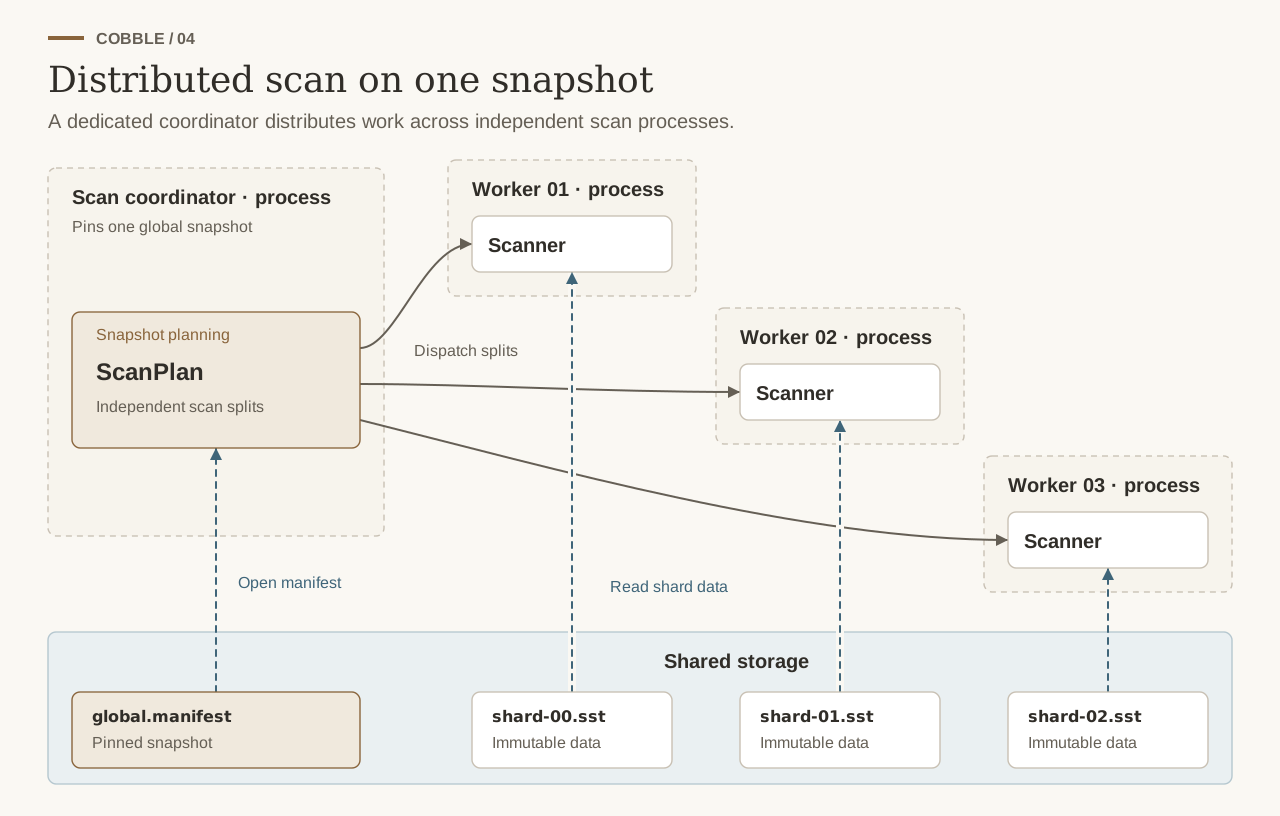
The application dispatches the splits and starts the workers. Every worker must be able to read the files referenced by the same pinned global snapshot; the figure shows one possible process layout.
1. Create a Scan Plan
A ScanPlan is generated from a global snapshot manifest. The plan is still bucket-only; column families are selected later when you create the scanner through ScanOptions:
use cobble::ScanPlan;

let plan = ScanPlan::new(global_manifest);
2. Generate Splits
Each split represents a unit of work (currently one shard = one split):
let splits = plan.splits();
// splits.len() == number of shards in the snapshot
3. Dispatch and Execute
Splits are serializable and can be sent to distributed workers:
use cobble::ScanOptions;

let scan_options = ScanOptions::for_column(0).with_column_family("metrics");

for split in splits {
    // Each worker opens a scanner from its split
    let scanner = split.create_scanner(config.clone(), &scan_options)?;

    for row in scanner {
        let (bucket, key, columns) = row?;
        // process...
    }
}
If you want a non-default family, this is the step where you must specify it. create_scanner(...) clones the full ScanOptions into the ScanSplitScanner, so the chosen column_family keeps taking effect inside each worker-side scanner.
Raw distributed scan rows include the owning bucket together with key and columns. When a worker needs to resume or repartition one split around a concrete row boundary, call split.split_after(bucket, key) and use the returned before / after splits.
Scan Options
| Parameter | Default | Description |
|---|---|---|
read_ahead_bytes | 0 | Read-ahead buffer size (0 = disabled) |
column_indices | None | Column projection — only read specified columns |
column_family | None | Column family name; omitted means the default family |
Column Projection
To read only specific columns, use ScanOptions. Projection indices are interpreted inside the selected column family:
let mut opts = ScanOptions::default();
opts.column_indices = Some(vec![0, 2]); // only columns 0 and 2
Bounded Scan
Bounds are set on the plan and copied to each split:
use cobble::ScanPlan;

let plan = ScanPlan::new(global_manifest)
    .with_start(b"start_key".to_vec())   // inclusive
    .with_end(b"end_key".to_vec());      // exclusive